Closed sessions
Every conversation you have had stays reachable. ctrl-y opens a picker of the sessions that are not running, newest activity first, and enter resumes the one you pick. It is how you get back to something you closed last week.
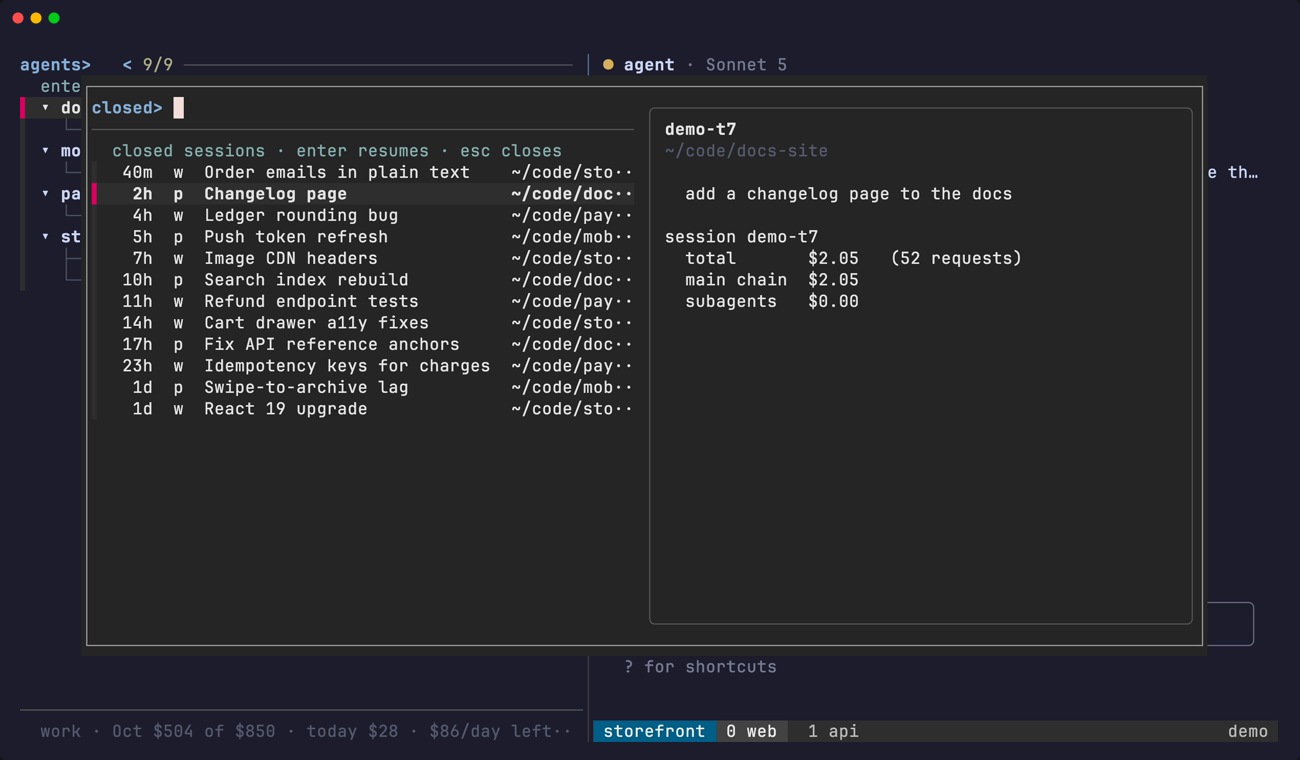
The picker
- Order: newest activity first.
- Name: the name this dashboard knows the session by, which is the one you typed with
ctrl-r, else the one$TA_LABELannounced at launch, else the session's first prompt, else its bare id. - Preview: the last ten prompts of that conversation, the directory it ran in, and what it cost when
tusagestill has it. enterresumes the one you pick, on the account it actually ran on and in the tmux session that owns its project.esccloses the picker without doing anything.
Where it comes from
Nothing here is a new store. Two files that were already being written are joined by session id:
$STATE_DIR/history.tsv, which the state hook appends a line to on every session start, turn end and session end.- Each account's own
<config dir>/history.jsonl, which has a line per prompt typed into it.
The file a prompt is in is also the answer to which login can resume the session, which is why the account column can be trusted.
A session is browsable for as long as either file remembers it. The directory a resume starts in is the last one the hook recorded, falling back to the prompt log's project, and to $HOME when that directory is gone.
Closed rows in the list
The closed rows inside the list are a different thing and still expire after 24 hours (DEAD_TTL, set with TA_DEAD_TTL in seconds). Those are panes whose state record is still around, offered where you last saw the agent.
tagents --closed-rows prints the machine-readable table the picker is built from.
Child sessions are never offered here; see States and order.