Notifications
tagents can post a desktop banner when an agent needs you, and a click on the banner takes you to that chat. It is how you find out about a question or a permission prompt while you are in another app. The macOS backend is the one that exists today.
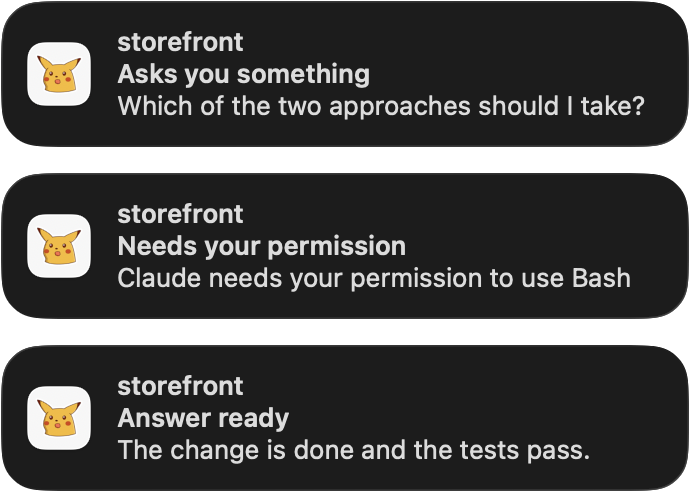
What raises a banner
| kind | when | default |
|---|---|---|
question | AskUserQuestion, plan approval, MCP elicitation | on |
permission | a permission prompt | on |
turn_done | the answer is ready, your move | on |
cache_expiring | the prompt cache is about to run out | on |
session_end | the session ended | off |
Each session has one notice at a time. A later notice replaces the earlier one instead of stacking, and a notice that is no longer true is withdrawn.
Whose notices you get
Notices come only from agents, meaning a Claude session in a tmux pane of its own. Three kinds of session never post one, and no option turns them on:
- An Agent-tool subagent. Its
SubagentStopand its ownStoppost nothing. A question or a permission prompt it raises blocks the agent that started it, so that one is posted as the agent's. - A child session: a
claude -pan agent started from its Bash tool, which the dashboard draws under that agent. - A headless session with no pane at all, such as a daemon's
claude -pturn. It reports wherever it was started from and would leave a click nothing to dock.
Install
Notifications are a plugin of tagents (@tagents/notify), so your config has to name it under plugins: before tagents notify is a verb (see the plugin model). It ships inside the managed copy, so two commands do it all:
tagents plugin add ~/.local/share/tagents/packages/notify
tagents notify install
The first writes notify: under plugins: in ~/.config/tagents/config.yaml and prints added notify → ….
On macOS this builds the helper app if it is stale, asks for permission, then writes and starts a LaunchAgent that runs the engine in the background. Elsewhere install refuses with no notification backend for <os> yet and exits 2.
Allowing notifications
tagents notify installmakes macOS ask whether "tagents" may send notifications: Allow.- If you missed the prompt: System Settings → Notifications → tagents → Allow notifications.
- Choose the Alert Style in System Settings → Notifications → tagents. "Persistent" keeps a notice on screen until you dismiss it, "Temporary" lets it disappear on its own (before macOS 26 they were called "Alerts" and "Banners").
- Focus and Do Not Disturb hide banners; the notices still land in Notification Center.
tagents notify statusmust saypermission: authorized.
macOS leaves the choice of Alert Style to you. When it is Temporary, install and status print a hint naming the setting, with a link that opens it. When it is off, the hint says that nothing is shown on screen at all. Nothing is printed when it is Persistent. The hint appears only once the permission is authorized: before that, the permission line is what to fix.
Login Items
macOS may announce a new background item in System Settings → General → Login Items & Extensions. It must stay allowed or launchd will not start the service.
Clicking a notice
What a click does is the click option:
click | what it does |
|---|---|
dock (default) | the same as enter in the dashboard list: the viewport shows the chat's window and the terminal goes to the dashboard |
goto | takes the terminal to the agent's own session, window and pane |
focus | only raises the terminal. So does a click on a session with no pane |
dock runs tagents --act open <pane> live <sid> <cwd>. The tagents it runs is the first one on the PATH of the shell that ran install (the one your dashboard runs; a symlink stays the symlink), else the checkout's own. TA_NOTIFY_TAGENTS overrides both. That matters because tagents re-points the global tmux focus hooks at whichever script ran, so a click running another one would move them away from the dashboard's.
Configuration
Everything is optional, in <configDir>/plugins/notify.yaml. These are the defaults:
backend: auto      # auto | macos | log | none — auto: macos on darwin, none elsewhere
click: dock        # dock: like Enter in the list · goto: the agent's own window · focus: terminal only
# icon: ~/pics/tagents.png   # a PNG for the notices' icon, unset by default; see below
events:
  question:       { enabled: true,  skip_visible: true }   # AskUserQuestion, plan approval, MCP elicitation
  permission:     { enabled: true,  skip_visible: true }   # a permission prompt
  turn_done:      { enabled: true,  skip_visible: true }   # the answer is ready, your move
  cache_expiring: { enabled: true,  skip_visible: false, after: 50m, ttl: 60m }
session_end: { enabled: false, skip_visible: true }- Durations are
<n>s|m|h, combined like1h30m, or a bare number of seconds.aftermust be belowttl. skip_visible: when the agent's tmux pane is in some client's current window and that terminal is the frontmost app, the notice is dropped.- Reloading: the file is reloaded when it changes, so there is nothing to restart. An invalid file is logged once per problem and the engine runs on the defaults;
tagents notify statusprints the problems. - Symlinked config directories work in full, such as
~/.config/tagentspointing into a dotfiles repository. Anotify.yamlthat is itself a symlink is seen only when the link is replaced, not when its target is edited.
The icon
icon is an absolute path, a ~/ path, or a path relative to the directory of the options file. Unset, the icon is notify-icon.png next to the helper app (~/Library/Application Support/tagents/, or next to TA_NOTIFY_APP) when that file exists, and the app has no icon of its own otherwise.
- The icon is part of the helper app, so run
tagents notify installafter changing it.installrebuilds an app that is stale and printsicon: <path>oricon: none, asstatusdoes. - An
iconthat names no file is a problem line in both, and the app is built without it. - An icon gives the helper its own bundle id,
io.github.skuratovicha.tagents-notify.i<first 8 hex of the icon's sha256>, because macOS keeps an app's icon from its first permission request. - After an icon change, macOS asks once more to allow notifications, and the new registration starts with the Persistent style. The old entry stays in System Settings → Notifications with the old icon, and can be switched off.
- Notification Center may keep showing the old icon:
killall NotificationCenterclears it. It restarts on its own, and notices already delivered stay.
Commands
| command | what it does |
|---|---|
tagents notify install | builds the app if stale, asks for permission, writes and starts the LaunchAgent, waits up to 5 s for it to run, prints the status and the steps. Exits 1, naming the cause, when the permission is not authorized, the options file is invalid, or the service is not running |
tagents notify uninstall [--purge] | boots the service out, deletes the plist and switches the event stream off; --purge deletes the app too |
tagents notify status | platform, backend, app (up to date, stale or missing), icon, permission and alert style, the script a click runs, the LaunchAgent, the stream, the options file and its problems, the service's memory |
tagents notify test [--kind <kind>] | posts one sample notice now; a click docks $TMUX_PANE when it is set |
tagents notify send [--title <text>] <message…> | posts a notice with this message now, through the configured backend, ignoring the per-kind switches and skip_visible; the title defaults to tagents, and a click docks $TMUX_PANE when it is set. This is what the notify_send tool of the plugin runs |
tagents notify run | the engine in the foreground until it is stopped. This is what the LaunchAgent runs |
Troubleshooting
Start with tagents notify status: it says what is wrong with the permission, the alert style, the script a click runs, the service and the options file.
To see what a click did, read the helper's log. Use the full path, because zsh has a log builtin that shadows the tool:
/usr/bin/log show --last 10m --predicate 'subsystem == "io.github.skuratovicha.tagents-notify"'Each click shows the command it ran, the app it raised, the child's exit status and, when there is one, the child's stderr.
What it costs
No polling. The service watches the state directory and the options directory with fs.watch and keeps at most two timers. Measured on an Apple M4 Pro with macOS 26.7.1, idle:
| resident memory | 22.5 MiB (about 60 MiB right after start, before the heap settles) |
| CPU | 0.005 % |
| one notice, event to helper exited | 67 ms (median of three) |
For developers
Adding a backend, the engine's design and the tests are in the package README.