Getting started
tagents is a dashboard of every Claude Code session running under tmux. This page takes you from nothing to a working list: install it, tell Claude Code to report to it, and open it.
What you need
tmux,fzf,jqandawk. tagents is written for bash 3.2 on purpose, since macOS ships nothing newer.git, to fetch and update the managed copy.- Node 22.18 or newer and
pnpm, to build the TypeScript packages the installer builds.
Install
curl -fsSL https://raw.githubusercontent.com/SkuratovichA/tagents/main/install.sh | shinstall.sh clones itself into ~/.local/share/tagents when it is not there yet. Flags go through sh -s --:
curl -fsSL https://raw.githubusercontent.com/SkuratovichA/tagents/main/install.sh | sh -s -- --hooks-dir ~/.claude/hooksOr clone it yourself and run the installer from the clone:
git clone https://github.com/SkuratovichA/tagents.git ~/.local/share/tagents
sh ~/.local/share/tagents/install.sh --hooks-dir ~/.claude/hooks
What the installer puts where
install.sh keeps one managed copy in ~/.local/share/tagents (set TAGENTS_HOME to move it): a clone detached on origin/main, built, and never developed in. What your machine runs are small real files that exec into it, not symlinks.
| where | what |
|---|---|
~/.local/bin | tagents, tusage, tnotes, tagents-core and tagents-knowledge |
each --hooks-dir | one wrapper per hooks/*.sh |
Give --hooks-dir once per Claude config directory you use; without it the installer uses ~/.claude/hooks. A wrapper is only written over a symlink or over another wrapper. Any other file with that name is left alone, with a warning and exit status 1.
Tell Claude Code about it
The installer does not touch Claude Code's own settings, so these two steps are yours. Without the hook there is nothing for the dashboard to show.
1. Register the state hook
Add the hook to ~/.claude/settings.json for eight events. The hook reads the event's name from the JSON Claude Code feeds it, so one command serves them all. PreToolUse, PostToolUse and SubagentStop are "async": true so they never sit in the tool-call critical path.
{
  "hooks": {
    "SessionStart": [
      { "hooks": [{ "type": "command", "command": "sh \"$HOME/.claude/hooks/tmux-agent-state.sh\"" }] }
    ],
    "UserPromptSubmit": [
      { "hooks": [{ "type": "command", "command": "sh \"$HOME/.claude/hooks/tmux-agent-state.sh\"" }] }
    ],
    "PreToolUse": [
      { "hooks": [{ "type": "command", "command": "sh \"$HOME/.claude/hooks/tmux-agent-state.sh\"", "async": true }] }
    ],
    "PostToolUse": [
      { "hooks": [{ "type": "command", "command": "sh \"$HOME/.claude/hooks/tmux-agent-state.sh\"", "async": true }] }
    ],
    "Notification": [
      { "hooks": [{ "type": "command", "command": "sh \"$HOME/.claude/hooks/tmux-agent-state.sh\"" }] }
    ],
    "Stop": [
      { "hooks": [{ "type": "command", "command": "sh \"$HOME/.claude/hooks/tmux-agent-state.sh\"" }] }
    ],
    "SubagentStop": [
      { "hooks": [{ "type": "command", "command": "sh \"$HOME/.claude/hooks/tmux-agent-state.sh\"", "async": true }] }
    ],
    "SessionEnd": [
      { "hooks": [{ "type": "command", "command": "sh \"$HOME/.claude/hooks/tmux-agent-state.sh\"" }] }
    ]
  }
}
2. Register the status line
The status line is what feeds the model column: it is the only place that knows which model a session is set to. It is registered with refreshInterval: 30, because without it an idle session never re-renders and its cost figure goes stale exactly when you are looking at it.
{
  "statusLine": {
    "type": "command",
    "command": "sh \"$HOME/.claude/hooks/claude-statusline.sh\"",
    "padding": 0,
    "refreshInterval": 30
  }
}
One copy per Claude config directory
Every Claude config directory you use (the config_dir of each account) needs its own hooks and statusLine entries in its own settings.json. A config directory without them runs no state hook and no status line, so agents started on it never appear in the dashboard and have no model column. That reads as a tagents bug and is a configuration one.
Optional: the tmux status bar and resurrect
Two additions to ~/.tmux.conf. Neither is required to open the dashboard.
A tally of your sessions in the status bar. The refresher keeps the option @tagents_counts current while a dashboard is open, and the #() in the branch that is not taken never runs, so this costs nothing per redraw:
set -g status-right '#{?@tagents_counts,#{@tagents_counts},#(~/.local/bin/tagents --counts)}'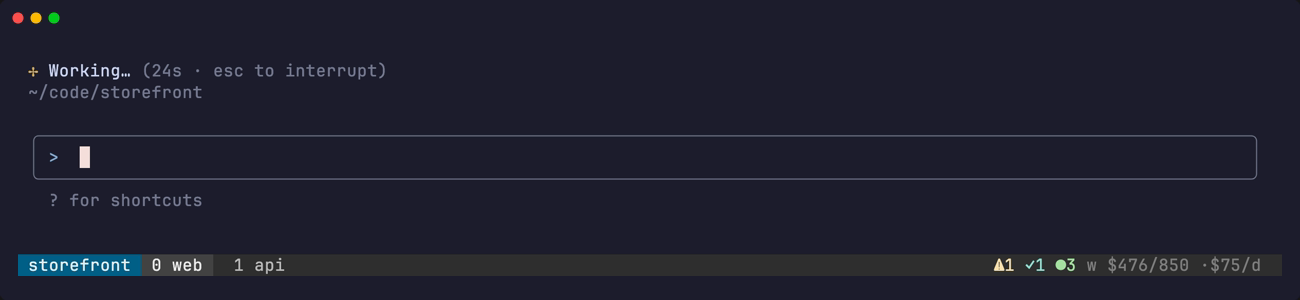
Two lines that make resurrect happen on its own, after the tmux-resurrect plugin settings:
set -g @resurrect-hook-post-save-layout '~/.local/bin/tagents --resurrect-save'
set -g @resurrect-hook-post-restore-all '~/.local/bin/tagents --resurrect --auto'
Run tmux source-file ~/.tmux.conf to pick them up.
First run
tagentsThat opens the interactive dashboard. Press ? to see every key and run the one you pick; Keys explains how to move them.
tagents               interactive dashboard
tagents --timeline    who worked when over the last day, as bars
tagents --counts      compact summary, for the tmux status bar
tagents --help        the real manual, with the reason for every non-obvious decision
Then start a few Claude Code sessions inside tmux and watch them appear. The dashboard explains what each row says.
Updating
tagents updateRunning the installer again is the update, and tagents update does exactly that: it fetches origin/main, moves the managed copy there, rebuilds, and rewrites the wrappers. A build that fails puts the copy back on the commit it was on. A copy with local changes is not moved, since your work belongs in a clone of its own.
tagents update --checkonly says whether main has moved.install.sh --launchdadds a LaunchAgent that runs the update daily at 04:17 (macOS). It remembers the--hooks-dirlist and thePATHof the shell that installed, so node and pnpm are found.
The Claude Code plugin
The same repository is also a Claude Code plugin that teaches your sessions how to use tagents. It does not replace the steps above:
/plugin install tagents --marketplace SkuratovichA/tagentsThe plugin page says what it adds.
Working on tagents itself
Clone it somewhere else (~/git/.../tagents) and run the suites from there; the installed copy stays on main. See Development.